|
Gemini
| #253
Gemini: How to use Gemini Spark and AI Studio
Want to see these tips early? Subscribe to the newsletter!
Hey friends, today I've got two ways to get a lot more out of Google Gemini, one paid and one completely free that barely anyone uses, so let's dive right in! 😁
Heads up: The first tip is for Gemini Spark, which is only available for paid Ultra subscribers, so I've included a free tip as well so no-one feels excluded. 😛
Gemini Spark connects the dots across your Google apps
We're all probably very familiar with this tedious routine: copy something from an email → switch to Calendar to book the follow-up → dig through Drive for the file → then back to a Google Doc to write it all up.
So wouldn't it be great if you could hand off that entire errand to AI…?
Enter Gemini Spark.
For those of you with access, paste this prompt within Gemini Spark and watch what happens:
"Create a spreadsheet of every match in this year's World Cup with the date and both teams. Then pull the transcript from my latest meeting and add the names of all the participants in the first tab so everyone can add predictions on which team would win."
Watch how much that one prompt sets in motion:
- "Create a spreadsheet" → Spark makes a new Google Sheet in my Google Drive
- "every match in this year's World Cup" → it searches the web for the full schedule
- "the transcript from my latest meeting" → it digs through my Google Calendar, finds the meeting, and pulls the transcript (a Google Doc) along with all the participants
- Then it stitches all of it into one sheet, start to finish, without me having to do anything
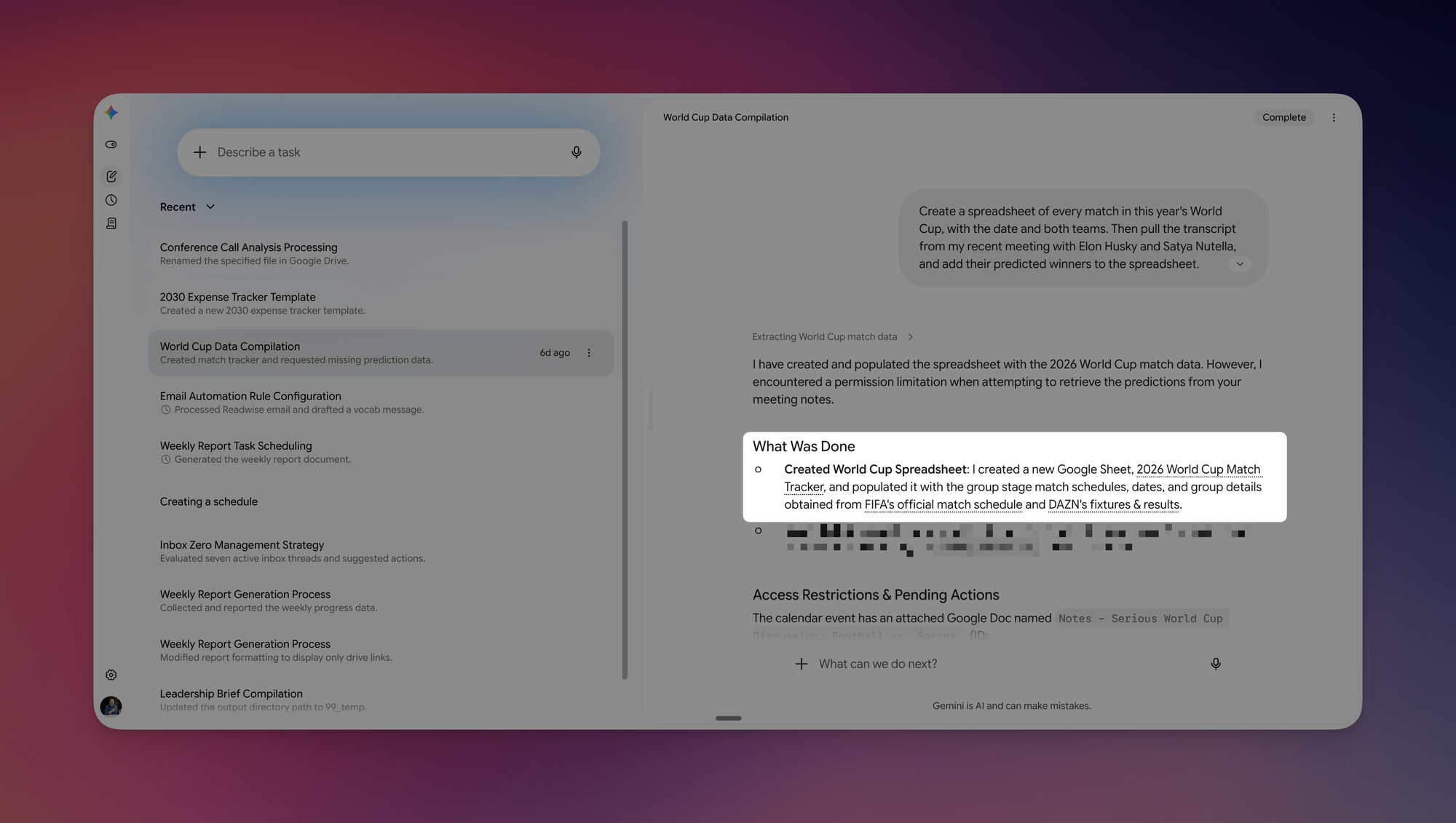
Spark was able to literally pull all the relevant information from Google Search, Google Drive, and Google Calendar and took action, without me opening a single app.
💡
Pro tip: You don't have to be precise. I said "my latest meeting" with no name or date, and Spark still found the right one. The more your work already lives in your Google apps, the less you have to spell out.
The free tip: the Gemini "playground" almost nobody opens
No worries if you don't have access to Gemini Spark yet (it'll most likely be available for all paid Gemini users at some point this year). Here's a tip any Gemini user can apply immediately:
- Go to aistudio.google.com > click the "Featured" card > select Gemini 3.5 Flash
- In the settings panel on the right, set Thinking level to High so it reasons longer before answering
- Turn on Grounding with Google Search
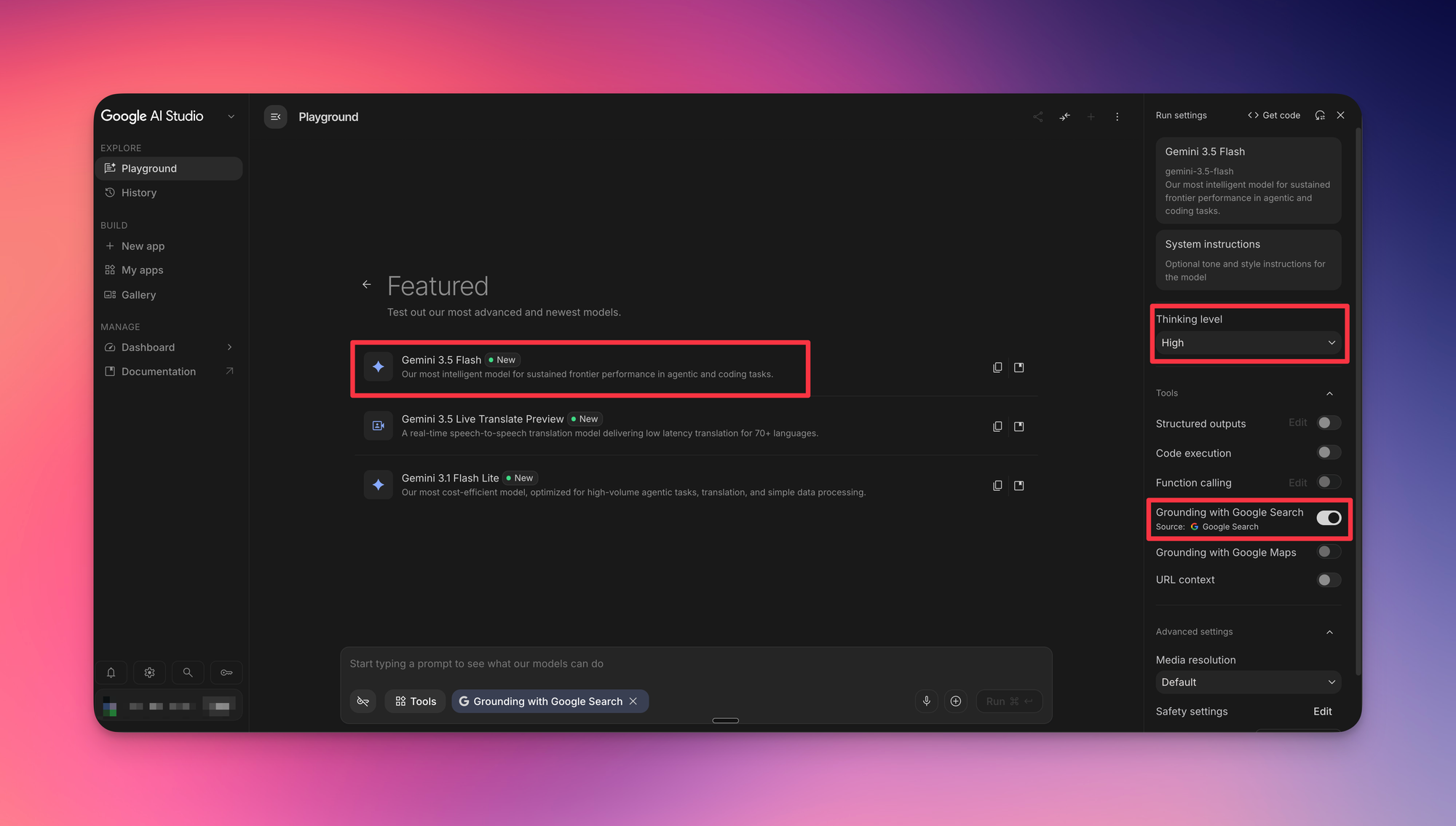
That "Grounding with Google Search" toggle means every answer now gets checked against live Google results with sources attached (unlike the normal Gemini Chat app on the web), on the newest Gemini models, for free.
Try one of these this week and let me know how it goes! 😁
Whenever you're ready, here are some other ways I can help you:
💻 The Workspace Academy: Never lose a file, task, or note again with my CORE workflow for Google Workspace. Adopted by over 10,000 Googlers.
✅ Build Your Command Center in Notion: Plug-and-play dashboard that surfaces today's priorities automatically and organizes your life in seconds. #1 rated Notion Course globally.