|
Google Forms
| #246
Google Forms: How to Automatically Stop Accepting Responses
Want to see these tips early? Subscribe to the newsletter!
Hey friends, Google Forms just quietly fixed something that's been driving me crazy for years, so let's get right into it! 😁
Set Your Forms to Close Automatically
If you've ever sent out a Google Form for event RSVPs, team signups, or time-sensitive surveys, you know exactly how this goes:
The deadline passes, you forget to go back and toggle off "Accepting responses," and three days later someone fills it out asking if there are still spots available.
(There haven't been spots for two days, that IDIOT. But now you have to write back politely and tell them that)
Here's the fix
Google Forms now lets you set an automatic cutoff, so here's what you do after publishing your form:
- Click the Published button in the top right
- Set a close date and time (e.g., "stop accepting responses on Friday at 5:00 PM") or a maximum number of responses (e.g., "stop after 50 responses")
- Set a
brutally honestfun message for people who missed the deadline
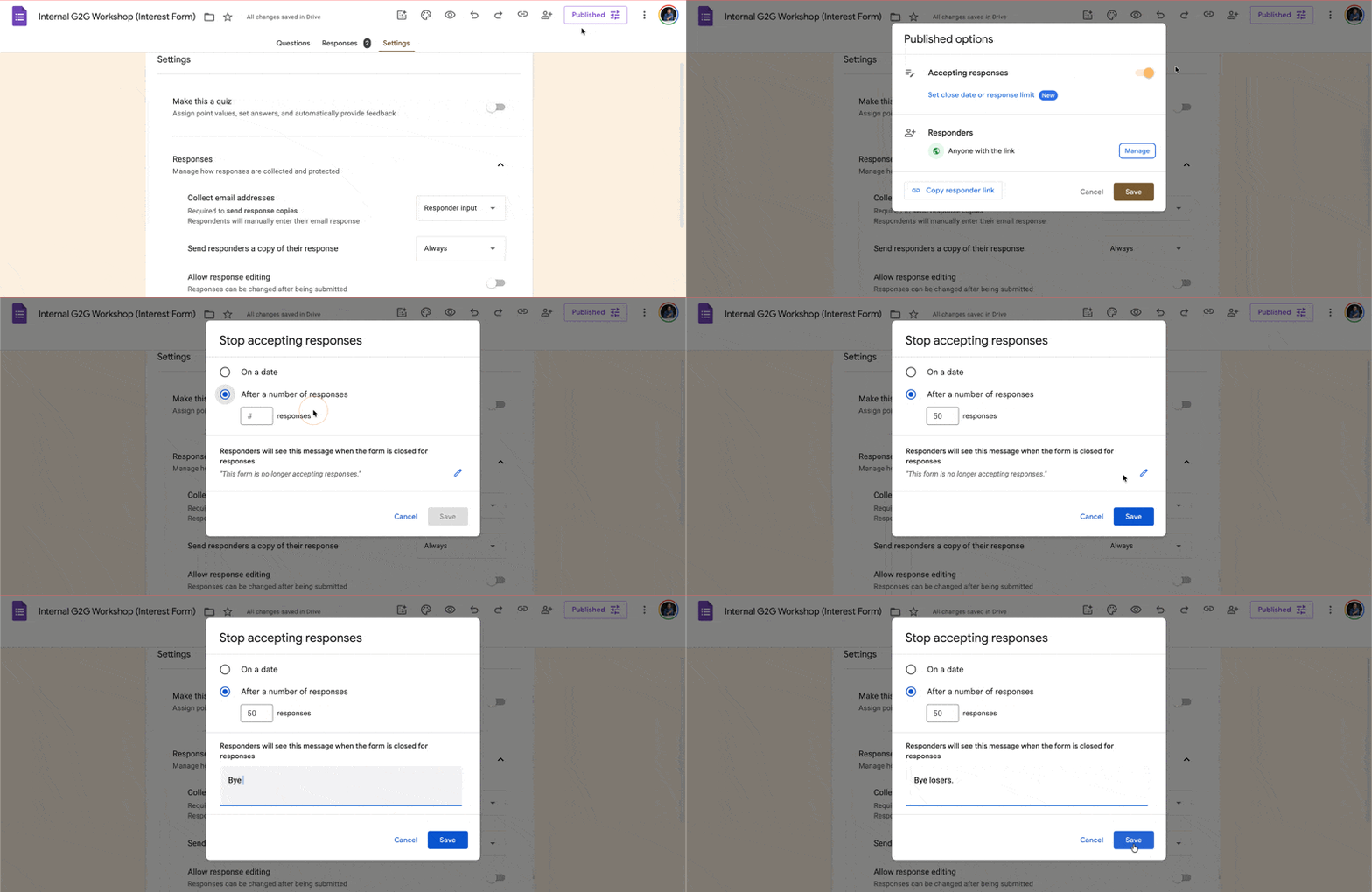
And that's it! The form handles the cutoff so you don't have to create a reminder to manually close the form.
💡
Pro tip: Set it to your headcount and the form closes itself. And yes, this works on all Google accounts, including free ones.
Try setting this up on your next Google Form and let me know how it goes! 😁
Whenever you're ready, here are some other ways I can help you:
💻 The Workspace Academy: Never lose a file, task, or note again with my CORE workflow for Google Workspace. Adopted by over 10,000 Googlers.
✅ Build Your Command Center in Notion: Plug-and-play dashboard that surfaces today's priorities automatically and organizes your life in seconds. #1 rated Notion Course globally.