|
Gemini
| #249
Gemini: How to Use the @gemini Shortcut in Chrome
Want to see these tips early? Subscribe to the newsletter!
Hey friends, this week I'm covering two of my favorite Gemini tips: a mechanical shortcut (but who doesn't like shortcuts) and an underrated technique that immediately improves your brainstorming, so let's get started! 😁
Tip #1: Ask Gemini Without Leaving Your Tab
You want to ask Gemini a quick question so you:
- Open a new tab...
- ...type gemini.google.com...
- ...wait for it to load...
- ...and finally type your question.
Here's a much easier way:
- Press CMD/CTRL + L to bring your cursor to the Chrome address bar
- Type @gemini and press Tab
- Type your question and hit Enter
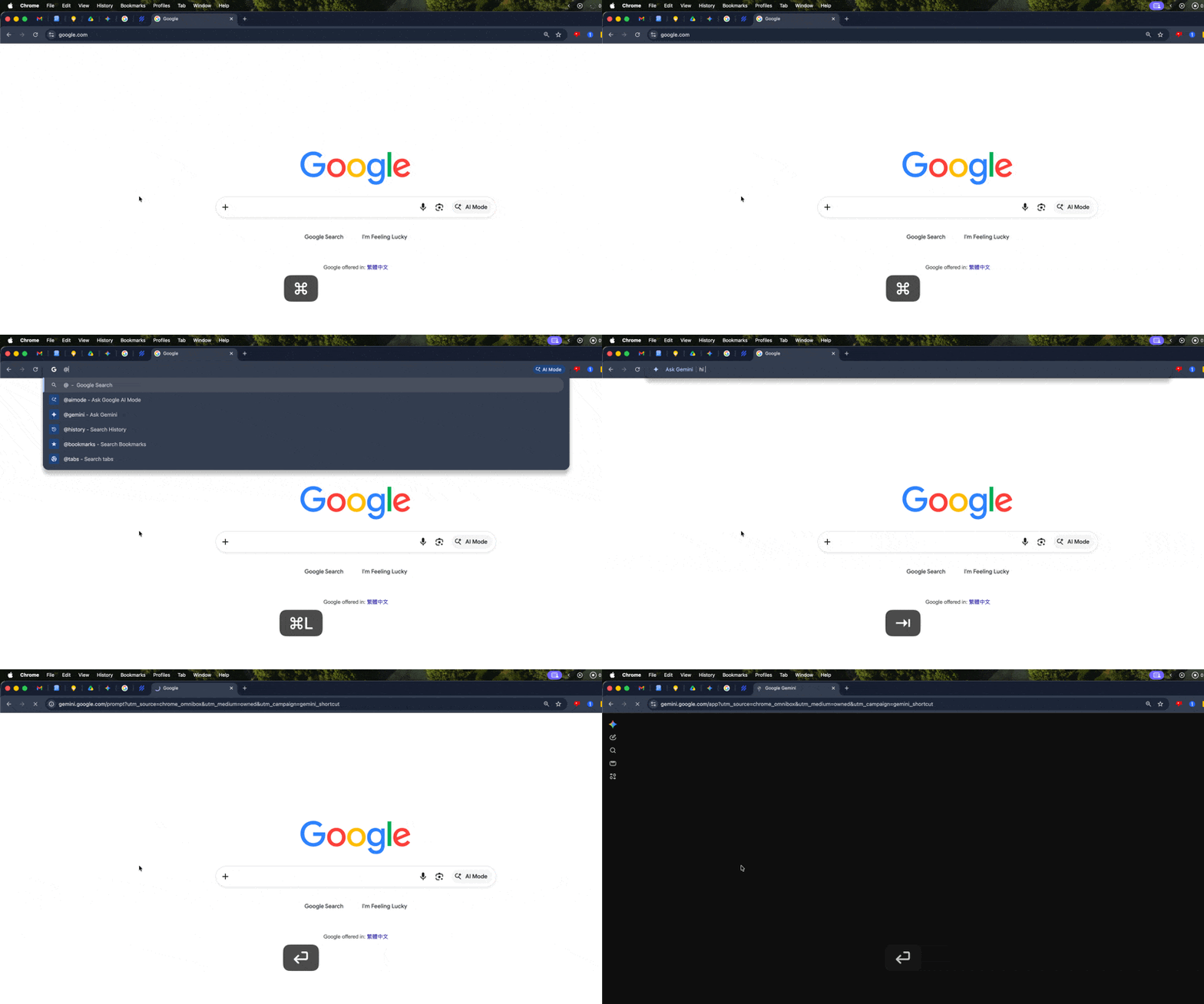
Boom. Gemini starts working right away.
💡
Pro tip: You can also type @bookmarks to search your saved bookmarks and @history to search your browsing history from the same address bar.
Tip #2: The "Answer Leveling" Technique
I've been using this prompting technique since 2024 and it still holds up today!
Here's the problem with asking Gemini to brainstorm: without structure, the ideas you get back are either painfully generic or so impractical you can't do anything with them.
Here's what to do instead:
Instead of asking Gemini for ideas from scratch, give it two levels of examples first:
- Share a "Level 1" idea: the boring, safe answer (e.g., a Level 1 birthday present might be jewelry)
- Share a "Level 2" idea: something better that you can still easily think of (e.g., a weekend getaway)
- Ask Gemini to come up with five "Level 3" ideas based on this progression
By showing Gemini the direction of improvement, you're calibrating it to think one step beyond what you'd come up with yourself.
Put simply, the Level 3 ideas are almost always things you haven't considered but are still realistic enough to actually do.
Try this out yourself
== COPY BELOW ==
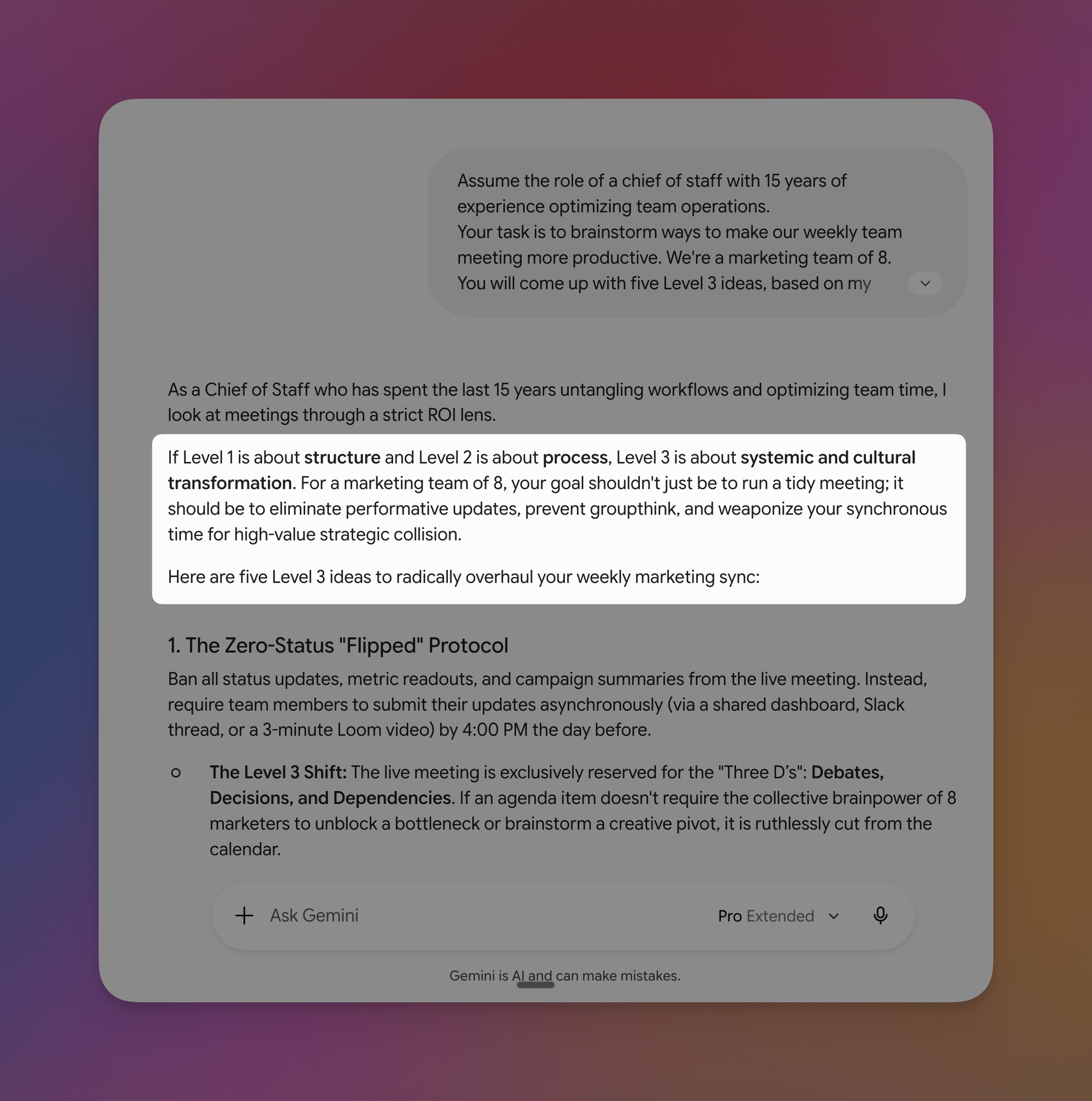
Assume the role of a chief of staff with 15 years of experience optimizing team operations.
Your task is to brainstorm ways to make our weekly team meeting more productive. We're a marketing team of 8.
You will come up with five Level 3 ideas, based on my examples below:
- Level 1: Share an agenda before the meeting and assign someone to take notes.
- Level 2: Use a standing format with time-boxed sections (updates, decisions, action items) and send a recap with owners and deadlines within 24 hours.
== END ==
💡
Pro tip: This works with any AI chatbot, not just Gemini.
⌨️ Keyboard Shortcuts
- CMD/CTRL + L = Jump to Chrome's address bar instantly
- CMD/CTRL + T = Open a new tab (when you do want a full Gemini session)
- CMD/CTRL + Shift + A = Search across all your open Chrome tabs
Try one of these this week and let me know how it goes! 😁
Whenever you're ready, here are some other ways I can help you:
💻 The Workspace Academy: Never lose a file, task, or note again with my CORE workflow for Google Workspace. Adopted by over 10,000 Googlers.
✅ Build Your Command Center in Notion: Plug-and-play dashboard that surfaces today's priorities automatically and organizes your life in seconds. #1 rated Notion Course globally.