|
AI
ChatGPT Work Tutorial: A Complete Beginner's Guide
Hey friends - if you use ChatGPT every day and already know that ChatGPT Work is a major upgrade, but you're still using it like a normal chatbot because nobody (not even OpenAI) can explain what you're supposed to do differently, you're in the right place! 😁
Watch it in action
Resources
- ChatGPT Work Starter Kit (the AGENTS.md starter template plus every prompt from this video)
- My free Cowork Toolkit (templates for organizing your rules, folders, and workflows in one week)
- Ghost (the platform this blog runs on)
- Free guide to ChatGPT Work (nine ready-to-run workflows, plus a clear breakdown of which model is good for what)
- The Cowork Academy (an AI Command Center that's 90% built the moment you download it)
ChatGPT Chat vs. Work vs. Codex
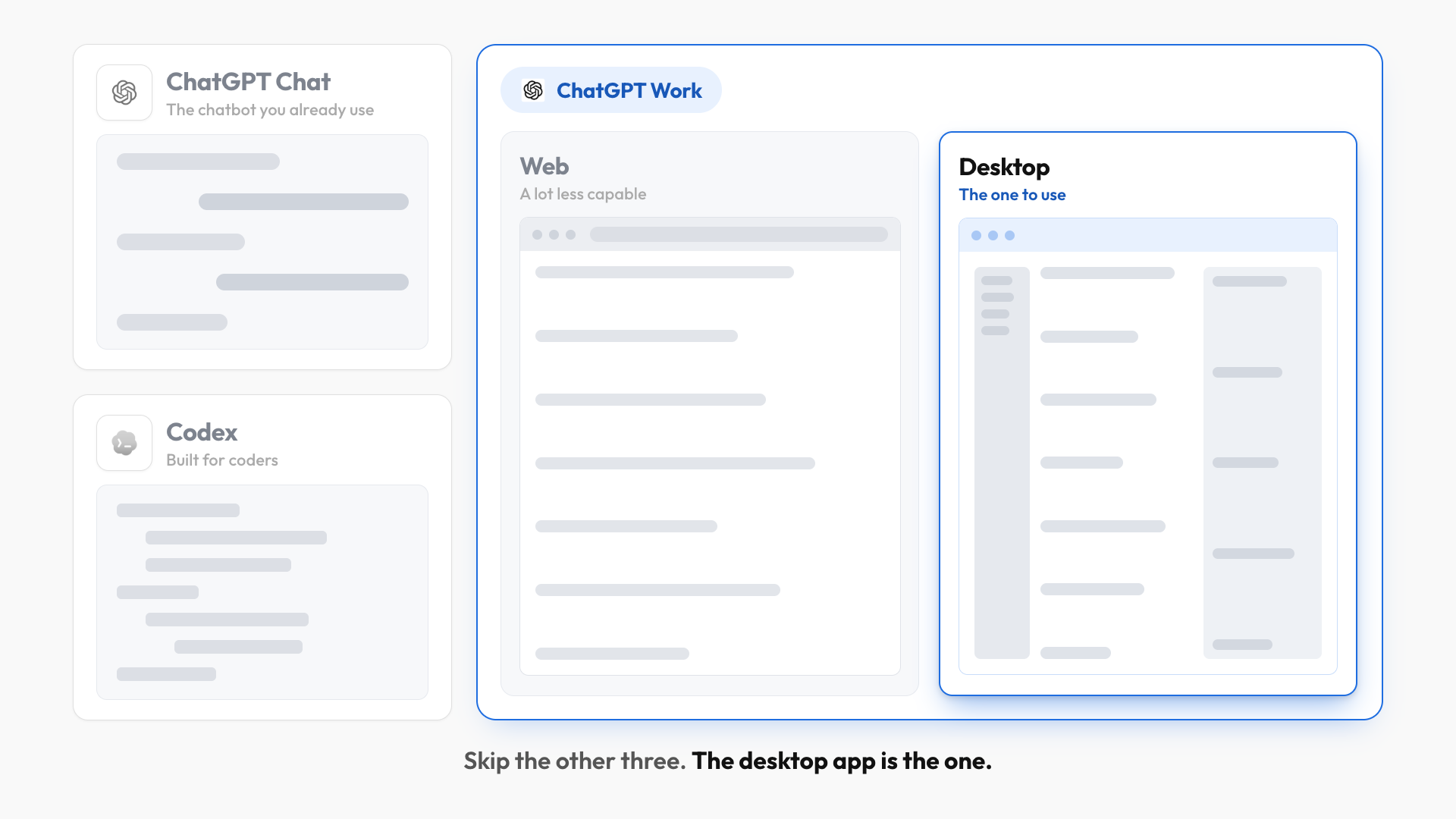
Before diving in, here's every product you have access to and who each one is for:
- ChatGPT Chat: The regular chatbot you already use.
- Codex: Built for coders and programmers, so we're skipping it entirely.
- ChatGPT Work (Web): Lives inside the web version of ChatGPT and although it has a few unique advantages it's A LOT less capable than the desktop version.
- ChatGPT Work (Desktop): The app every non-technical person should use and the one we're focusing on today!
AGENTS.md: ChatGPT Work's Rulebook
Once you've downloaded the desktop app, you only need one other thing to unlock its full capabilities: a single document written entirely in plain English.
Think of it as the master rulebook for ChatGPT Work and it has four sections:
- Purpose explains how the document works.
- Global Rules holds the instructions ChatGPT Work follows for all tasks.
- Voice Principles controls how the AI writes.
- Maintenance explains how ChatGPT Work should keep the file organized as it grows.
To set this up:
- Make a copy of the starter template linked above, then click File > Download > Markdown (.md).
- Rename the file to
AGENTS.mdexactly. Not AGENT, not AGENTS1. - Create a folder anywhere on your desktop and call it something like "[Your Name] WorkOS."
- Move the file into that folder.
- Back in the desktop app, make sure Work is selected, then choose that folder as your Project.
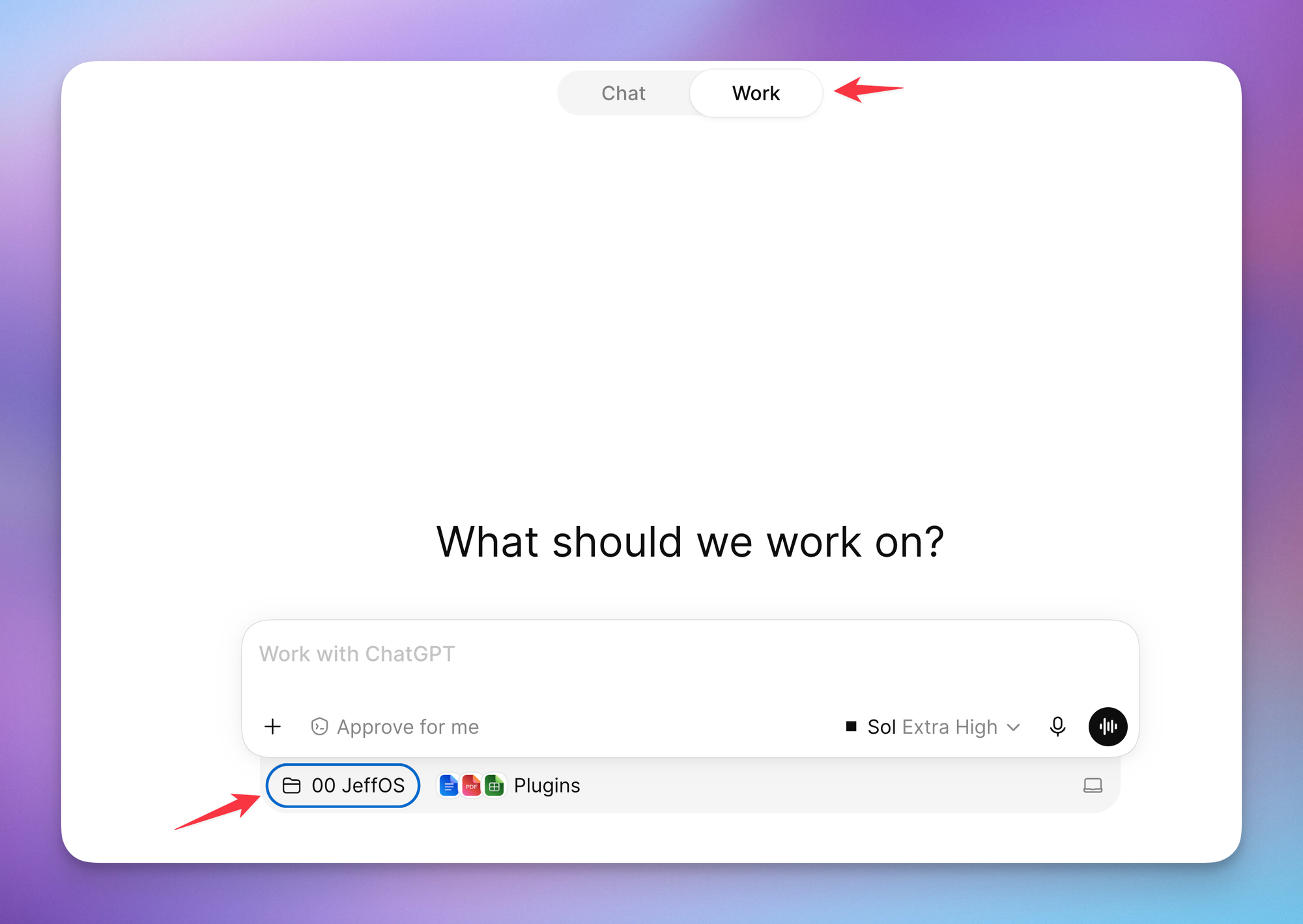
Once your folder is mounted, ChatGPT Work automatically reads the file before it performs any task.
The best part is that you don't maintain the file by hand. Just tell it what to remember, for example:
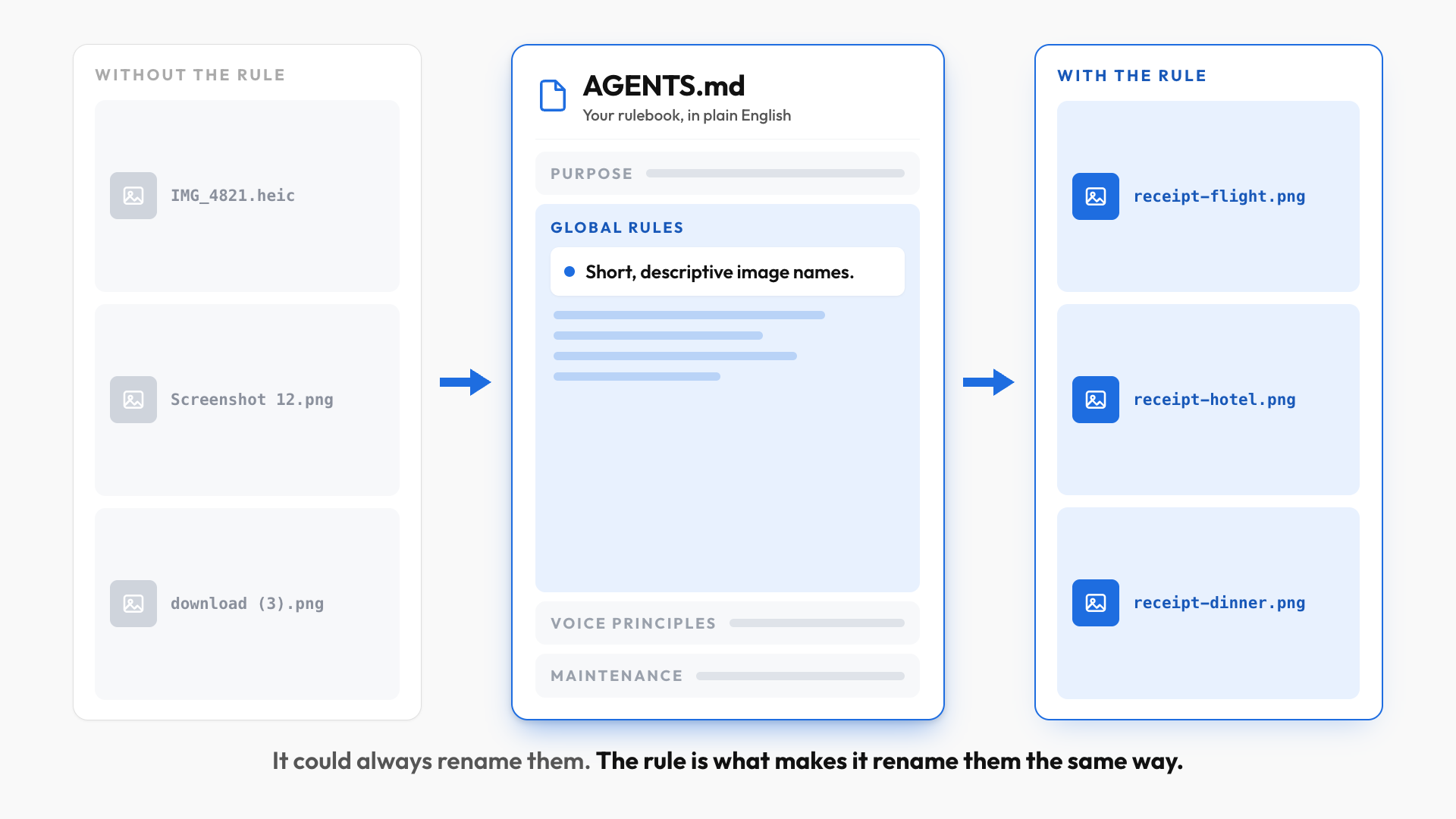
Remember this rule: Whenever I ask you to rename image files, use a short but descriptive name so I know what each image is without opening it.
A moment later, that rule appears as a new subsection under Global Rules. Drop a folder of photos into your WorkOS folder, ask it to rename them, and they come back following your convention.
To be clear, ChatGPT Work could already rename images. Without rules in place it just renames them differently every time, which is what makes the results inconsistent.
💡
Most important takeaway from this post: if you use ChatGPT Work without mounting a folder, you're basically using regular ChatGPT.
ChatGPT Work Plugins + AGENTS.md
Basically, Plugins connect ChatGPT Work to the apps you already use, like Gmail, Notion, and Slack.
But access by itself isn't that useful. Teaching it how you like to use that app is another thing entirely, and that's where your rulebook comes in.
Start a new chat with your folder mounted and say:
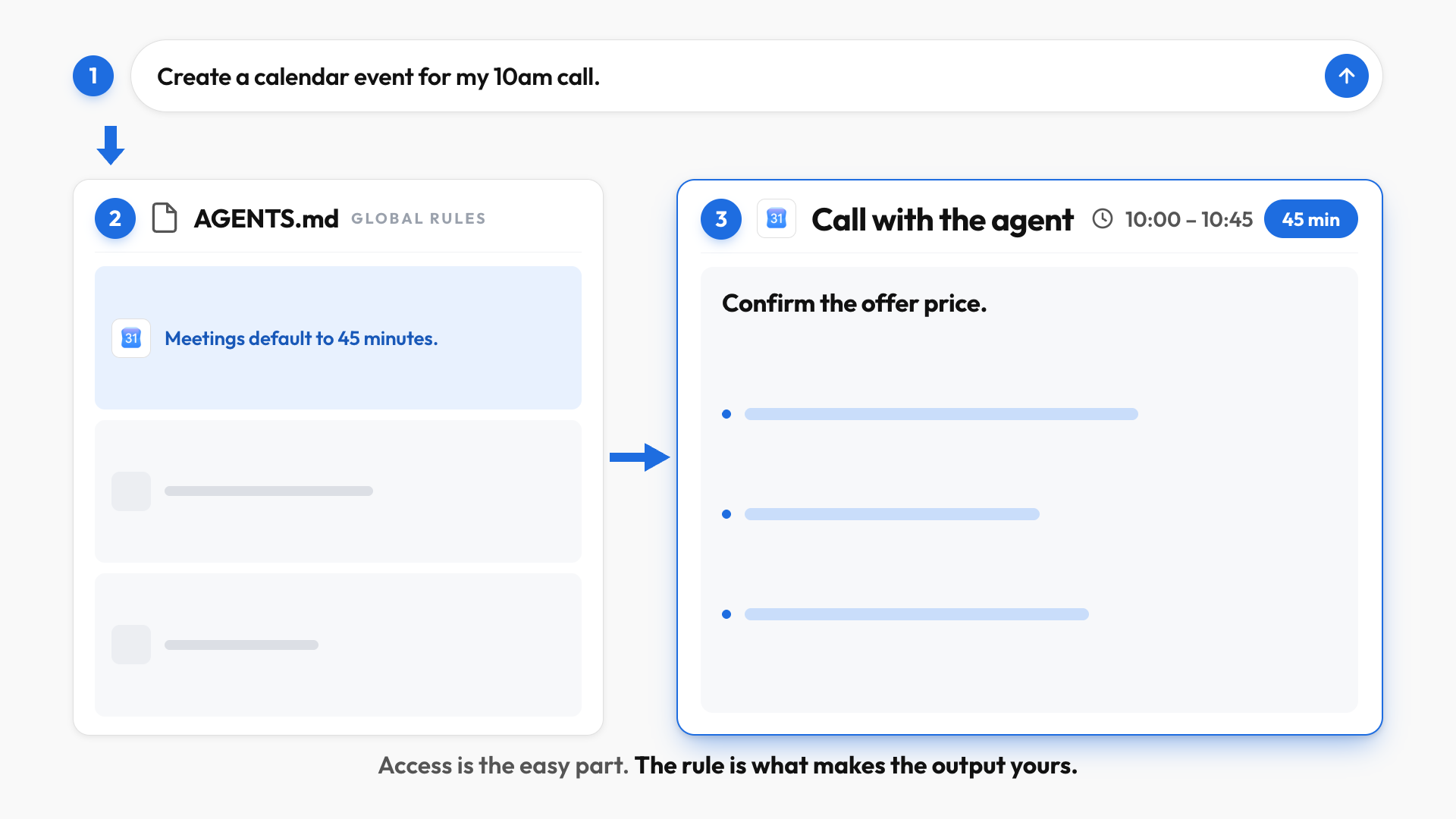
Remember this rule: Meetings default to 45 minutes, and format Google Calendar descriptions so they're easy to scan: start with bottom line up front followed by 3 short bullets with relevant context.
From then on, a request like "create a calendar event for my call with the real estate agent tomorrow at 10am" produces a 45-minute event formatted exactly that way, without you repeating the instructions.
But you'll soon run into a problem: As you connect more tools, keeping every rule inside just one file can get VERY messy. And because ChatGPT Work loads your main rulebook before every single task, a bloated file means worse outputs and wasted tokens.
Pro tip: move all tool-related rules out into their own file.
Create a Tool Conventions.md file that will house all rules governing tools moving forward. Move every tool- or plugin-specific rule from AGENTS.md into it. Replace the moved content in AGENTS.md with a link.
Three plugin rules worth adding today:
- Gmail: Never include a sign-off in my Gmail replies because I already have a default signature set up.
- Notion: Always use the existing templates in my Notion databases instead of creating pages from scratch.
- Slack: When summarizing Slack threads, always separate the output into Decisions, Action Items, and Open Questions.
The Side Panel
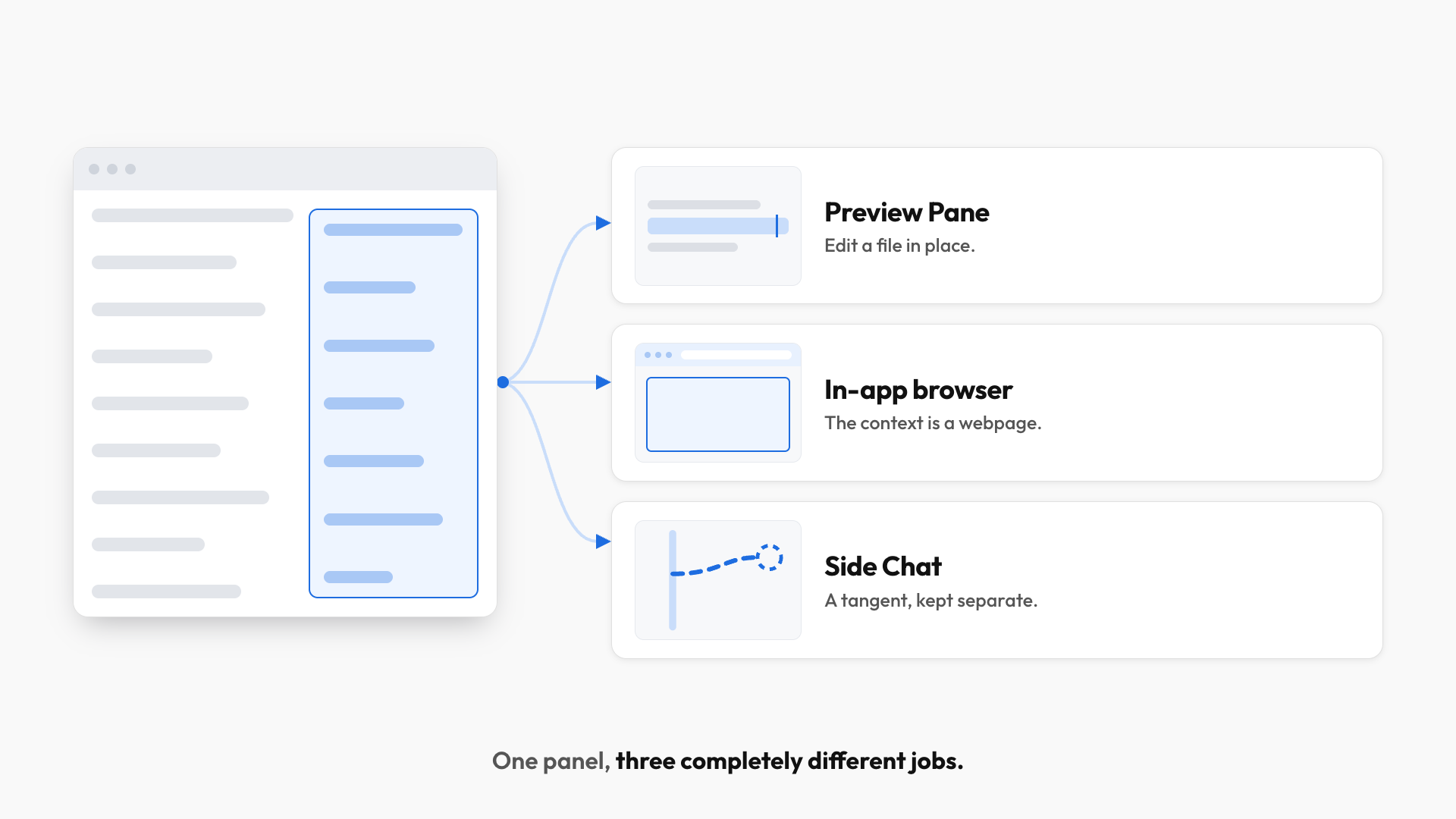
The Side Panel does three completely different jobs:
#1: Preview Pane
Open any file in the side panel to review and edit it in place. You can highlight a section, click Edit, and describe the change you want in plain English. And if it gets it wrong, just click undo!
💡
Pro tip: whenever you see a hyperlinked file or folder, right-click and choose Show in Finder to locate it in your workspace, so you can drag it somewhere else.
#2: In-app browser
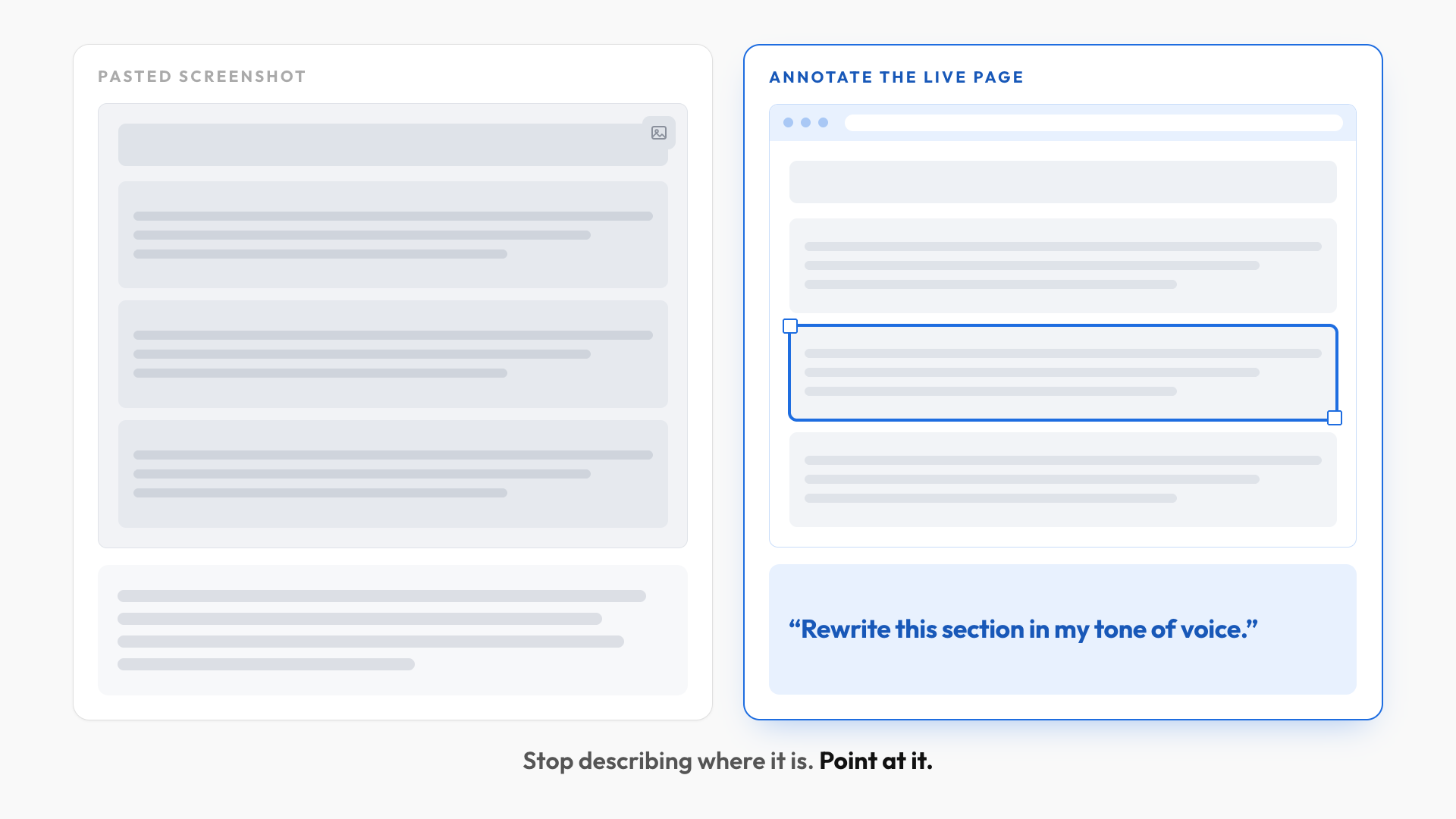
Press CMD/CTRL + T and type a URL to open a fully functional browser inside the app. There are two reasons this beats pasting screenshots or a link:
- Annotation mode. Click the Annotate icon, select part of a page, and describe the change. It's like leaving a comment directly on a website: instead of describing where something is, you point at the exact element. Ask for a dark mode preview of a section and you get a mockup back.
- Signed-in work. You can log into your accounts inside that browser, which hands off genuinely tedious jobs. I had it test every link inside a course's lesson descriptions for dead links and confirm they all open in a new tab.
One thing to know: a mockup and a live change are two separate steps. Anyone can open a public webpage and ask for a preview, but actually pushing a change live requires ChatGPT Work to be connected to that platform. And signing in anywhere is a privacy trade-off only you can price.
#3: Side Chat
Type /side to open a temporary chat that sees everything in your current conversation without interrupting it, which can be SUPER useful when you have a question mid-task and don't want to potentially interrupt the main thread.
Three things to know about it:
- It already has your context. Meaning there's no need to re-explain or re-upload anything.
- Nothing flows back. Meaning what happens in the side chat stays out of the main chat (I almost typed "What happens in Vegas stays in Vegas" lol, must be muscle memory 😏).
- Closing it deletes it. Meaning you should copy anything you want to keep before you close the side chat.
Here's the mental model to carry forward:
- Use the Preview Pane to review or edit a file it surfaced in-chat.
- Use the in-app browser when the context you want to share lives on a website.
- Use Side Chat when a tangent needs the same context as the main task but shouldn't change the deliverable.
Skills: turn your own edits into rules
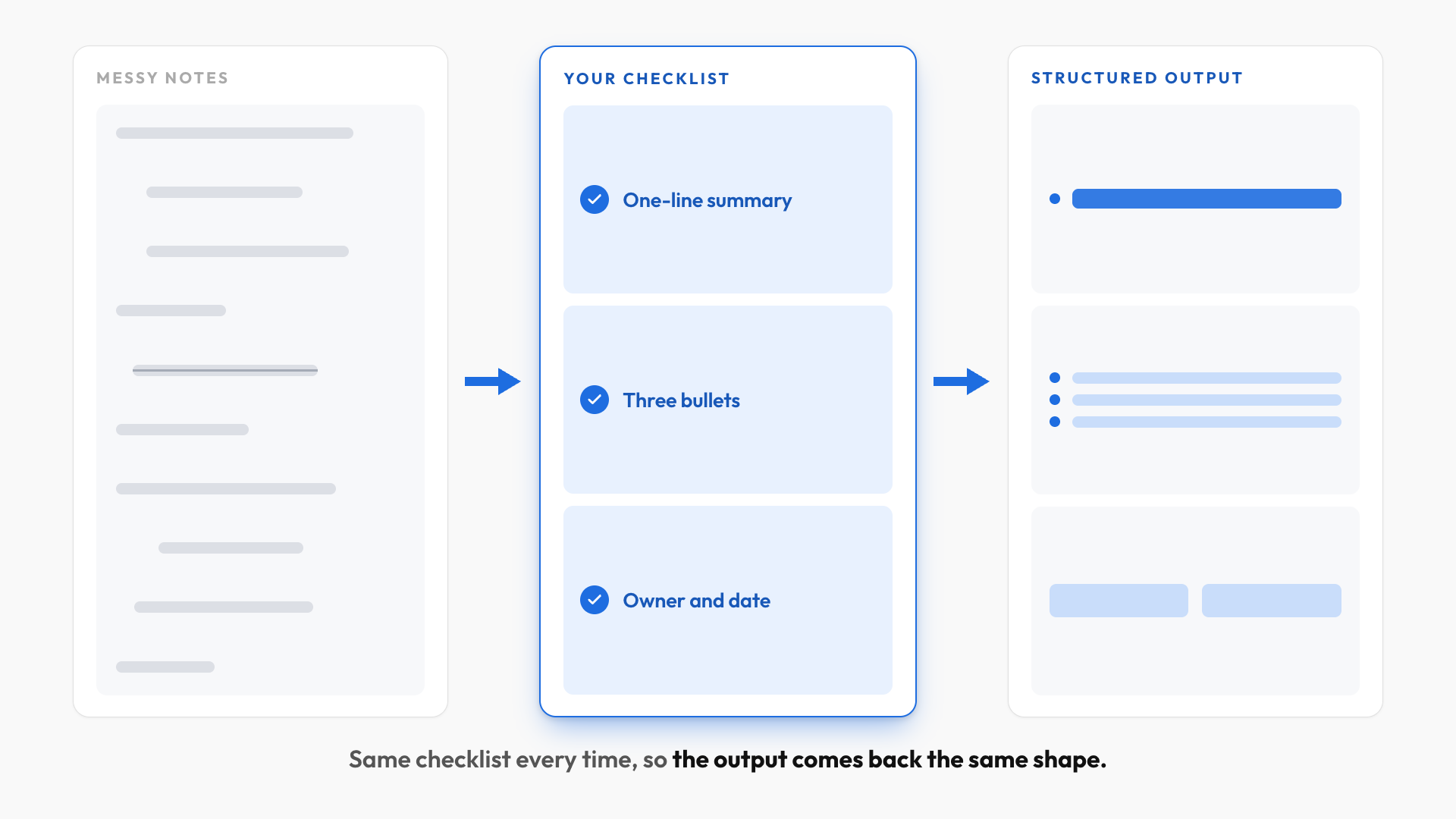
A Skill takes an input, like messy notes, runs it against a checklist of rules you create, and gives you a structured output.
Now that you understand the benefits of using the AGENTS.md file, the most useful Skills you can build are those that will "learn" from your edits and corrections.
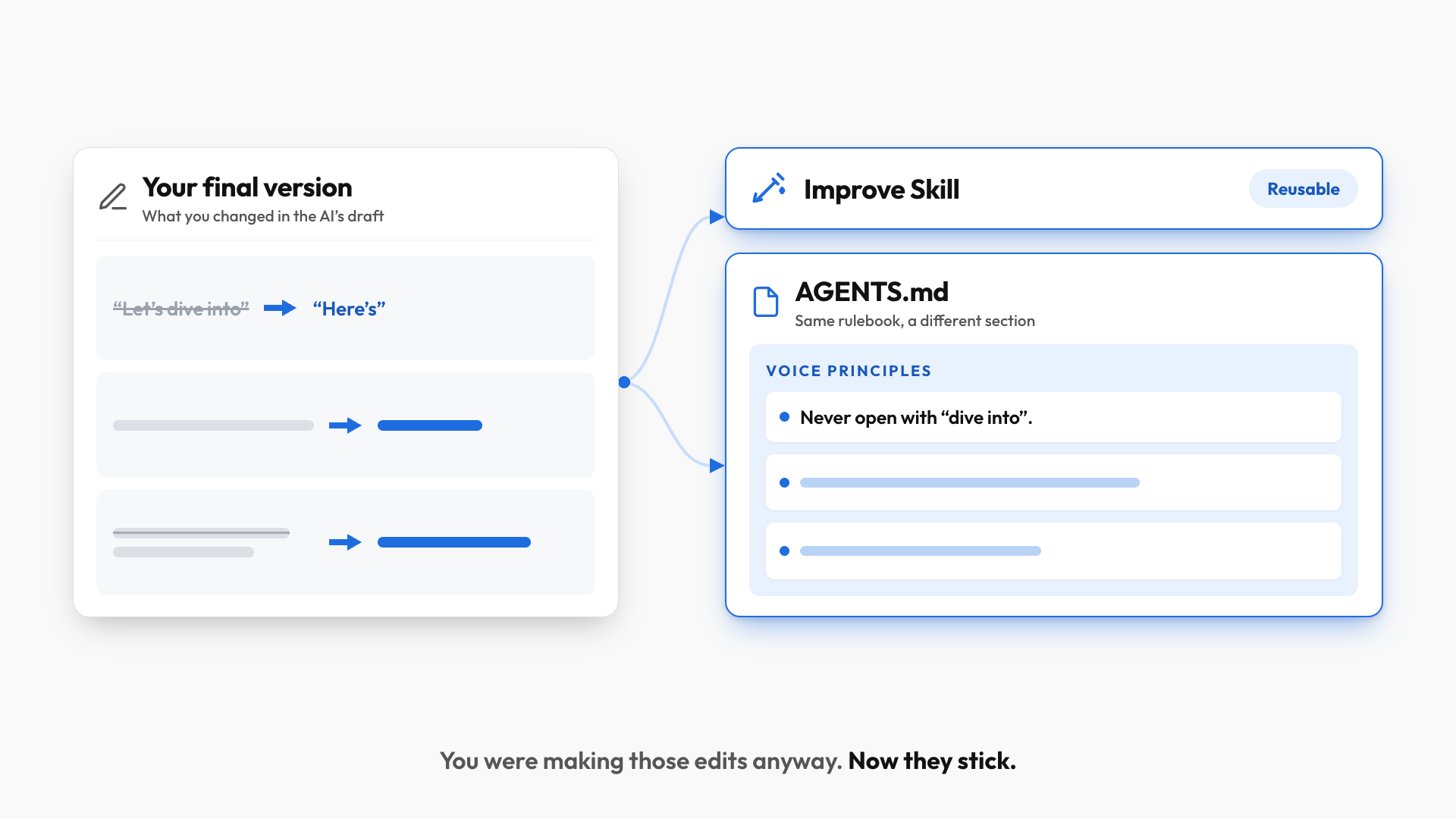
For example, let's say ChatGPT Work drafted your newsletter, you rewrote it, and you've pasted your final version back into the same chat.
In that same chat, say:
Compare this final newsletter against your original draft earlier in this chat. Identify the repeatable differences in my writing style, then create an Improve Skill I can run whenever I give you a draft and my final version. Show me the proposed learnings before updating the Voice Principles section of AGENTS.md.
Two things happen at once. You get a reusable Improve Skill, and you get a set of proposed writing rules extracted from the gap between the draft and your final.
That's the whole point of Skills: you were going to make those edits anyway, so you may as well turn them into rules that mean you re-explain yourself less over time.
The Routing Map: Your Next Step
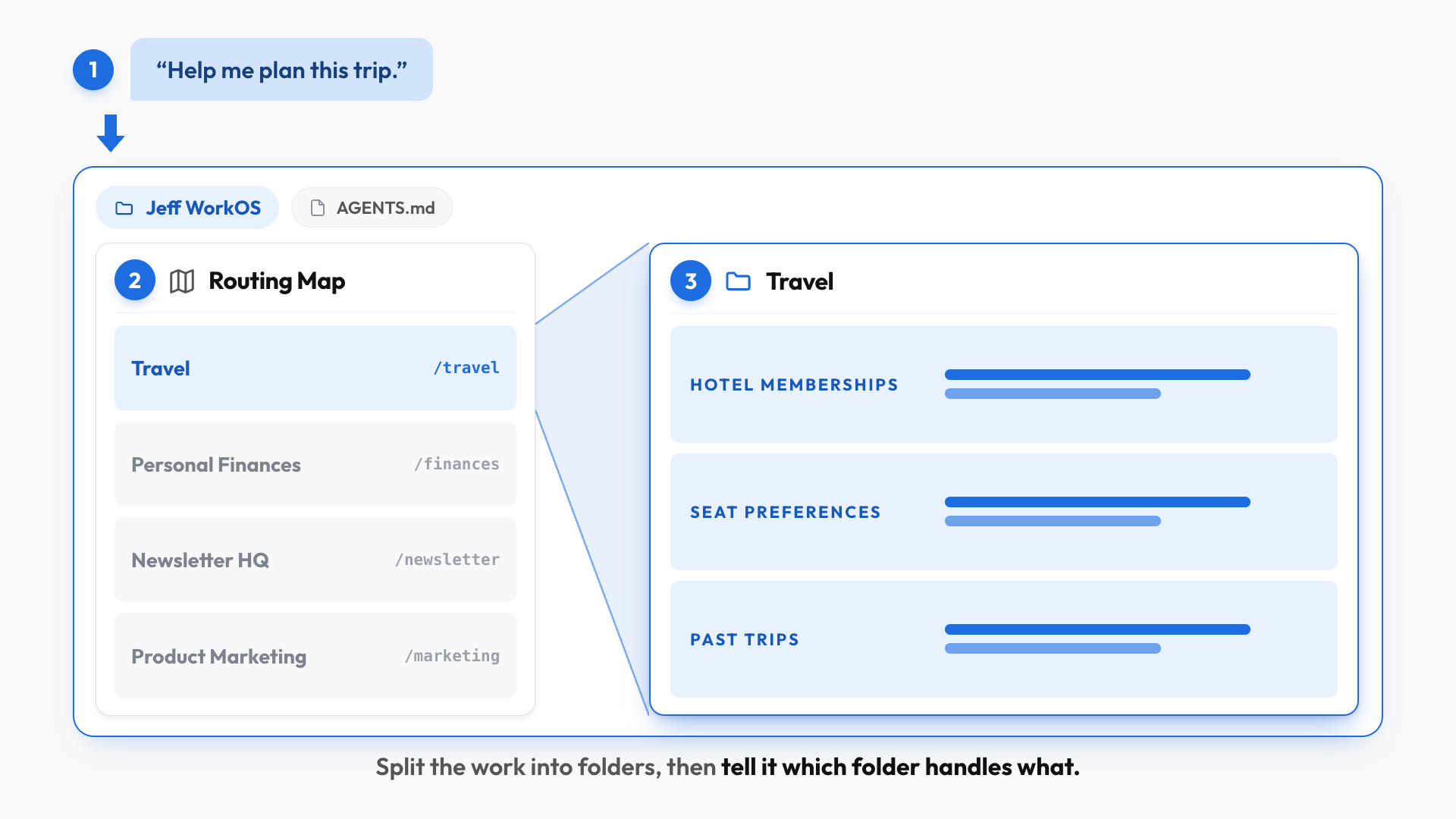
In a nutshell, instead of throwing all your files into one giant folder (that gets messy super quickly), you want to implement something called a "Routing Map" that splits your work into smaller folders.
Specifically, you'd create one folder for each recurring part of your job or life (e.g. Personal Finances, Travel, Product Marketing, Newsletter HQ, Digital Marketing, etc.), and then tell ChatGPT Work which folder handles what.
Try it yourself
Drag a new folder into your workspace (preferably one with real context in them, like a folder with your travel plans), then type this into a fresh ChatGPT Work chat:
Review the new Travel folder I just added to this workspace. Add a Travel entry to the Routing Map so future travel-related requests are routed to this folder. Finish by showing me the exact entry you added and explain why.
Next, start a fresh chat, ask how the workspace would handle planning a trip, and it points at the Travel folder on its own, because that folder holds everything related to trips: hotel memberships, seat preferences, and what happened on previous trips.
And if you use both, you don't have to choose. The same folder can hold an AGENTS.md that ChatGPT recognizes and a CLAUDE.md that Claude recognizes, so one workspace serves both.
If you enjoyed this...
You might also like: How to Give AI Perfect Memory (a complete guide)